

Sending a Loom video over cold email is the most effective strategy I’ve ever seen in my 3 years writing cold email copy.
Do other strategies work?
Of course.
Do I ONLY pitch Loom videos in my cold email copy?
Nope, I still pitch calls and soft CTAs like “Mind if I share more info?”
But when I’m working with a saturated or competitive offer, you bet I’m gonna use a Loom video CTA to get prospects to bite and say “Sure, send it on over.”
Loom videos give you 3-5 minutes to prove your expertise and separate yourself from the pack, while a cold email gives you 3-5 seconds.
Sell the video in the email, then use the video to sell the call and show prospects why you’re better than the 50 other agencies pitching them on a daily basis.
The calls you get on will be WAY more high-intent, because prospects have already seen your face, know what you’re selling, and are semi-bought into what you’re selling.
“But what if I don’t want to take 10 minutes and record a personalized Loom video for every prospect that replies to my email?”
Then this guide probably isn’t for you. Yeah, you can record a cookie-cutter video and blast it to everyone that replies, but it’s not going to convert at a high level and bear fruit.
If you are ready to commit 10 minutes of effort to create a personalized Loom for warm prospects, then keep reading because I’m about to walk through my entire process.
Pitching the video in your CTA
One of the first questions I get asked about this strategy is “Should I send a link to the video in the initial email?”
And my answer is always NO!
Instead of making some templated video and blasting it out to a list of leads, or even worse, sitting down to create a Loom for EVERY single person you’re reaching out to…
Simply ask if they want to see it first.
Asking for Permission First
This works for two reasons:
First, for some strange human psychology reason, people are much more likely to view your video if you ASK to send it over instead of sending it upfront.
It makes sense when you break it down…
Someone will always be more excited to watch something when there’s curiosity and anticipation leading up to it, instead of it being readily available to begin with.
Second, asking if they want to see it works because you ONLY have to make videos for people that ask for one.
Instead of blasting a video to 1000 people in your list, you can make a custom one for the 23 people that replied to you that week.
Best of all, this gives you an extra chance to vet prospects as they reply.
> Are they qualified?
> Are they an ideal client?
> Does it look like they’d have the budget?
If they check all 3 boxes, then you can go ahead and make the video.
If not, pass over them and move on to the next.
Here’s how to ask for permission:
Loom Video CTAs
Here are a few of my favorite CTAs for pitching videos:
"Mind if I share a video explaining further?"
“Would you like to watch a quick video explaining how our process works?”
“Any interest in watching a video explaining how we can do the same for you?”
“Would you be interested in seeing a quick video explaining how we can get you XYZ result fully guaranteed?”
“Mind if I send over a quick video demo explaining how our tool/software/service works?”
Feel free to mix and match these and come up with your own…
These are just some of my personal favorites. Put your own spin on it, add your own sauce. That’s when the best results come anyways.
Shoot, I almost forgot my favorite CTA of all:
“I recorded a quick video explaining further, mind if I share it with you here?”
And to answer your question, NO I don’t already have the video made.
Once again, for some weird psychological reason, people are more likely to say YES if you already “have the video made” (even though you didn’t record it yet).
To them, it looks like you already put the effort in to make a video for them…
Making your ask of a simple “yes” reply seem a lot more reasonable.
Then, once you get the “yes”, you fulfill your promise and actually make the video.
Almost like a “videos payable” that you have to make good on.
Just make sure to record the video and send it over within a few hours of them replying so they don’t get cold feet.
Now you have a list of prospects eager to see your pretty face on a Loom…
It’s time to make a video that blows their face off and makes it impossible for them to NOT book a call with you.
Recording the Loom Video
Believe it or not, your video shouldn’t be a pitchfest.
Crazy right? Prospects who have no clue who you are don’t want to watch a 5 minute video pitching them a service? Who would’ve thought!
Instead, you need to pack as much value as humanly possible into a 5 minute video so the person watching books your closest available Calendly slot and asks if you take cash or credit.
Don't overthink the video itself.
Follow these rules:
> 3-5 minutes MAX
> Start the video with a clear agenda
> Close the video with a CTA pushing for a call
And of course, make sure the video is actually VALUABLE.
3-5 Minutes Max
This is a rule of thumb… Not an ACTUAL rule.
Your video can be as long as you want it to be.
If you’re really engaging on camera and have real value to communicate, your video can be 15 minutes and it’ll still get watched all the way through.
But from what I’ve seen, 3-5 minutes is the sweet spot with these types of videos…
Intro yourself, spit some game and give value, pitch a call, wrap it.
Doesn’t need to be some elaborate, pre-scripted video…
In fact, the more off the cuff and natural, the better.
Start the Video With A Clear Agenda
Before anything else, start the video on the prospect’s website so the site is what shows up in the thumbnail.
This will sell the click, and the agenda to start the video will sell them on watching the entire thing.
Think of the video as a cold email…
> Personalized intro with a compliment about their site
> 3 tips they can implement to achieve X results or improve X metric
> CTA to jump on a call with you to learn more
But before you jump into the body of the email, end the personalization off with an agenda for the video.
Something like:
“Hey Tom,
My name’s Christian, one of the co-founders at KnowledgeX. In this video I’ll be going over 3 things I see on your website you can change to immediately start booking more inbound meetings on your calendar.
First, …”
This way you set expectations for the video, and Tom knows I won’t be spending 5 minutes pitching him my services and going over my pricing packages.
No one wants to hear about your pricing packages on a Loom video, I promise.
End the Video With a CTA to Get on a Call
Just like you’d pitch a call at the end of a cold email, the goal of the Loom is to get prospects on the phone.
You can send the most valuable Loom video of all time…
A HALL OF FAME level Loom video…
But if you don’t pitch a call and give the prospect VERY CLEAR next steps, it won’t matter.
When you’re ready to wrap, don’t just say “Let me know if this was valuable to you, thanks!”
That ain’t gonna cut it.
Instead, make it VERY clear what the next steps are:
“The best next step is to hop on a quick call to discuss how we can help you implement these changes onto your website.
Tomorrow and Friday are wide open for me in the afternoon, let me know how 2 PM EST works for you either of those days.
If not, feel free to book a time that works with you on the calendar link I sent over in the email.
Talk soon!”
No guesswork involved, and you’re suggesting a handful of times that work with you so all the prospect has to do is reply “2 PM tomorrow works” and you can book the call manually.
Easy money!
Booking A Call on the Backend
The majority of your work is done…
You got a reply, made the video, now there’s only one thing left to do:
Get the damn call booked! It doesn’t matter how good your video is if the person on the other end never watches it and books a call from it.
Here’s how to take this video strategy to the finish line and book calls:
Embed the Video in Your Email
First, make sure you EMBED the Loom thumbnail in your email… Don’t just copy and paste a hyperlink and call it a day.
> Click the blue "share" button in Loom
> Click "embed"
> Copy the GIF thumbnail
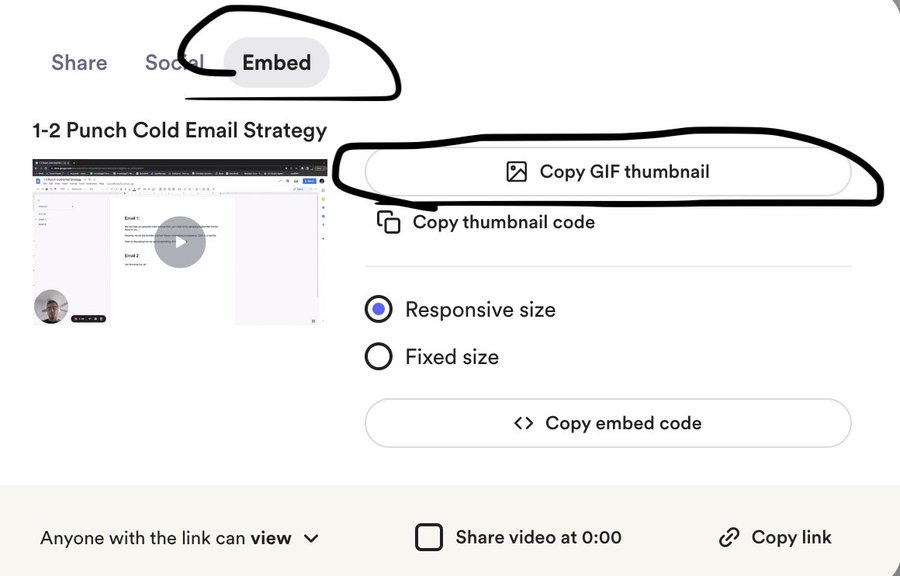
Now that you have the GIF copied, it should appear in your email as a thumbnail rather than a link.
This step is important…
The thumbnail will preview your video in the email and show your face on the prospect’s website so they trust you enough to actually click on it and watch.
Sending the Video Over Email
Once you paste the thumbnail into your email, the rest of your email copy should follow this template below:
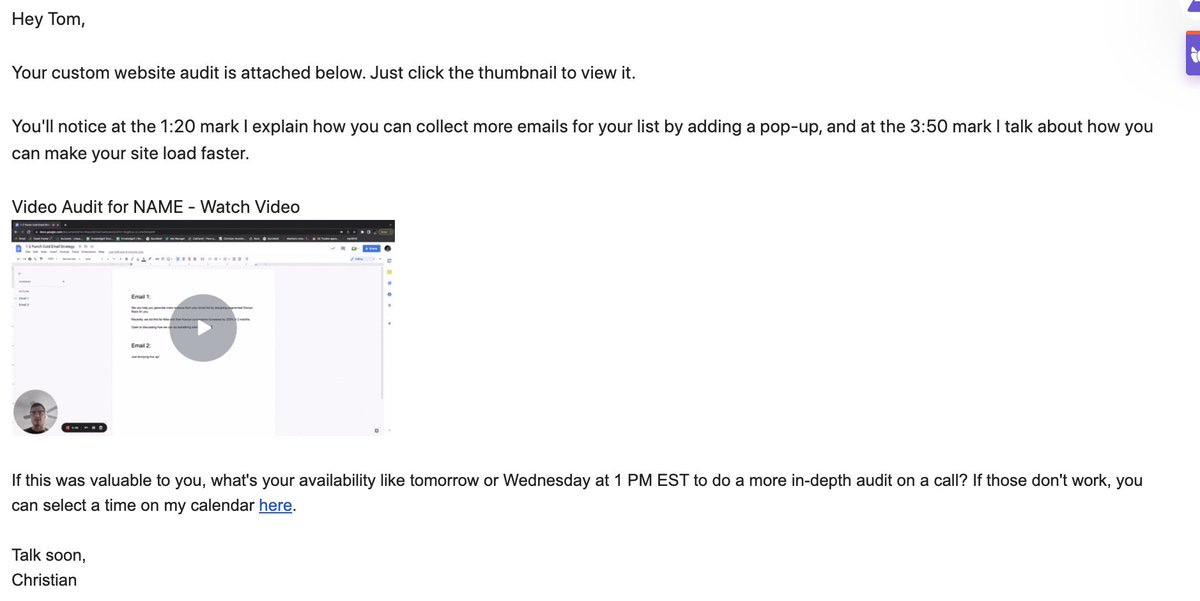
Couple notes on this:
> Tell them to CLICK the thumbnail to the video. Sounds silly, but it will improve your "video watched" rate
> Find 2 timestamps in the video and mention them in the email, will pique their interest enough to watch the whole video
- Add a written CTA proposing a call with SPECIFIC dates and times. Make it as simple as possible for the prospect to coordinate a call with you.
Notice how the CTA also moves the frame away from “yes” or “no”, and towards “does Tuesday or Wednesday work better?” and then includes a booking link in case those times don’t work.
Following Up
Even if you follow all of these steps to a tee, there will still be prospects that ghost you.
Maybe they watch the video and don’t get back to you, or maybe they never even watched the video in the first place…
Either way, it’s on you to follow up as many times as necessary to either a) get a call booked or b) get told to fuck off.
Here are some follow up templates:
“Were you able to implement the tip I referenced at the 2:30 mark? How’d it work? If you have any more questions, let me know how tomorrow at 1 PM EST works for a quick call.”
“Noticed you had a chance to watch the video - you likely found something you can apply to your website right away to boost conversions… How’s Friday work for a quick call to discuss further?”
“Just got a notification that you viewed the video, open to a quick call to learn how we can help you implement these changes on your website?”
Or, if they haven’t viewed the video:
“Noticed you haven’t had the chance to watch the video yet. Once you see it, let me know if XYZ strategy was valuable to you - happy to hop on a call to show you how to implement this"
“Excited to hear your feedback on the video - let me know what you think about the 3:00 mark where I go over a simple tweak you can make to your CTA button to boost your conversions by X%. Happy to hop on a call to show you how to implement this.”
These are templates specifically related to the video, you can also tap into your arsenal of regular follow-ups that you’d use for any other cold email conversation.
Even hit em with the classic…
🕵️
Get creative with your follow-ups… Get ballsy too.
If you see they viewed the video, cold call them, share the video with a higher-up at the company… Connect on LinkedIn.
Do whatever it takes to get a response and you’ll start booking calls left and right!
That’s all…